Running with nthreads = 4
DataSetInfo : [dataset] : Added class "Signal"
: Add Tree sig_tree of type Signal with 1000 events
DataSetInfo : [dataset] : Added class "Background"
: Add Tree bkg_tree of type Background with 1000 events
Factory : Booking method: ␛[1mBDT␛[0m
:
: Rebuilding Dataset dataset
: Building event vectors for type 2 Signal
: Dataset[dataset] : create input formulas for tree sig_tree
: Using variable vars[0] from array expression vars of size 256
: Building event vectors for type 2 Background
: Dataset[dataset] : create input formulas for tree bkg_tree
: Using variable vars[0] from array expression vars of size 256
DataSetFactory : [dataset] : Number of events in input trees
:
:
: Number of training and testing events
: ---------------------------------------------------------------------------
: Signal -- training events : 800
: Signal -- testing events : 200
: Signal -- training and testing events: 1000
: Background -- training events : 800
: Background -- testing events : 200
: Background -- training and testing events: 1000
:
Factory : ␛[1mTrain all methods␛[0m
Factory : Train method: BDT for Classification
:
BDT : #events: (reweighted) sig: 800 bkg: 800
: #events: (unweighted) sig: 800 bkg: 800
: Training 400 Decision Trees ... patience please
: Elapsed time for training with 1600 events: 1.32 sec
BDT : [dataset] : Evaluation of BDT on training sample (1600 events)
: Elapsed time for evaluation of 1600 events: 0.0145 sec
: Creating xml weight file: ␛[0;36mdataset/weights/TMVA_CNN_Classification_BDT.weights.xml␛[0m
: Creating standalone class: ␛[0;36mdataset/weights/TMVA_CNN_Classification_BDT.class.C␛[0m
: TMVA_CNN_ClassificationOutput.root:/dataset/Method_BDT/BDT
Factory : Training finished
:
: Ranking input variables (method specific)...
BDT : Ranking result (top variable is best ranked)
: --------------------------------------
: Rank : Variable : Variable Importance
: --------------------------------------
: 1 : vars : 9.348e-03
: 2 : vars : 8.860e-03
: 3 : vars : 8.833e-03
: 4 : vars : 8.725e-03
: 5 : vars : 8.176e-03
: 6 : vars : 8.009e-03
: 7 : vars : 7.992e-03
: 8 : vars : 7.705e-03
: 9 : vars : 7.688e-03
: 10 : vars : 7.576e-03
: 11 : vars : 7.525e-03
: 12 : vars : 7.373e-03
: 13 : vars : 7.365e-03
: 14 : vars : 7.286e-03
: 15 : vars : 7.185e-03
: 16 : vars : 7.183e-03
: 17 : vars : 7.166e-03
: 18 : vars : 7.163e-03
: 19 : vars : 7.153e-03
: 20 : vars : 7.125e-03
: 21 : vars : 6.994e-03
: 22 : vars : 6.966e-03
: 23 : vars : 6.962e-03
: 24 : vars : 6.957e-03
: 25 : vars : 6.914e-03
: 26 : vars : 6.858e-03
: 27 : vars : 6.846e-03
: 28 : vars : 6.818e-03
: 29 : vars : 6.759e-03
: 30 : vars : 6.751e-03
: 31 : vars : 6.630e-03
: 32 : vars : 6.608e-03
: 33 : vars : 6.563e-03
: 34 : vars : 6.551e-03
: 35 : vars : 6.407e-03
: 36 : vars : 6.359e-03
: 37 : vars : 6.226e-03
: 38 : vars : 6.219e-03
: 39 : vars : 6.131e-03
: 40 : vars : 6.118e-03
: 41 : vars : 6.066e-03
: 42 : vars : 6.023e-03
: 43 : vars : 6.017e-03
: 44 : vars : 5.918e-03
: 45 : vars : 5.888e-03
: 46 : vars : 5.872e-03
: 47 : vars : 5.869e-03
: 48 : vars : 5.867e-03
: 49 : vars : 5.846e-03
: 50 : vars : 5.840e-03
: 51 : vars : 5.783e-03
: 52 : vars : 5.759e-03
: 53 : vars : 5.746e-03
: 54 : vars : 5.745e-03
: 55 : vars : 5.682e-03
: 56 : vars : 5.626e-03
: 57 : vars : 5.535e-03
: 58 : vars : 5.508e-03
: 59 : vars : 5.502e-03
: 60 : vars : 5.482e-03
: 61 : vars : 5.444e-03
: 62 : vars : 5.356e-03
: 63 : vars : 5.283e-03
: 64 : vars : 5.242e-03
: 65 : vars : 5.211e-03
: 66 : vars : 5.121e-03
: 67 : vars : 5.117e-03
: 68 : vars : 5.116e-03
: 69 : vars : 5.099e-03
: 70 : vars : 5.098e-03
: 71 : vars : 5.095e-03
: 72 : vars : 5.065e-03
: 73 : vars : 5.008e-03
: 74 : vars : 4.993e-03
: 75 : vars : 4.909e-03
: 76 : vars : 4.903e-03
: 77 : vars : 4.881e-03
: 78 : vars : 4.880e-03
: 79 : vars : 4.874e-03
: 80 : vars : 4.865e-03
: 81 : vars : 4.839e-03
: 82 : vars : 4.836e-03
: 83 : vars : 4.827e-03
: 84 : vars : 4.794e-03
: 85 : vars : 4.793e-03
: 86 : vars : 4.764e-03
: 87 : vars : 4.760e-03
: 88 : vars : 4.734e-03
: 89 : vars : 4.734e-03
: 90 : vars : 4.725e-03
: 91 : vars : 4.708e-03
: 92 : vars : 4.695e-03
: 93 : vars : 4.694e-03
: 94 : vars : 4.684e-03
: 95 : vars : 4.678e-03
: 96 : vars : 4.650e-03
: 97 : vars : 4.594e-03
: 98 : vars : 4.593e-03
: 99 : vars : 4.592e-03
: 100 : vars : 4.589e-03
: 101 : vars : 4.558e-03
: 102 : vars : 4.552e-03
: 103 : vars : 4.538e-03
: 104 : vars : 4.521e-03
: 105 : vars : 4.482e-03
: 106 : vars : 4.441e-03
: 107 : vars : 4.426e-03
: 108 : vars : 4.375e-03
: 109 : vars : 4.368e-03
: 110 : vars : 4.364e-03
: 111 : vars : 4.360e-03
: 112 : vars : 4.347e-03
: 113 : vars : 4.302e-03
: 114 : vars : 4.289e-03
: 115 : vars : 4.268e-03
: 116 : vars : 4.221e-03
: 117 : vars : 4.181e-03
: 118 : vars : 4.147e-03
: 119 : vars : 4.128e-03
: 120 : vars : 4.103e-03
: 121 : vars : 4.097e-03
: 122 : vars : 4.058e-03
: 123 : vars : 4.026e-03
: 124 : vars : 4.007e-03
: 125 : vars : 4.001e-03
: 126 : vars : 3.976e-03
: 127 : vars : 3.973e-03
: 128 : vars : 3.956e-03
: 129 : vars : 3.954e-03
: 130 : vars : 3.915e-03
: 131 : vars : 3.886e-03
: 132 : vars : 3.874e-03
: 133 : vars : 3.870e-03
: 134 : vars : 3.836e-03
: 135 : vars : 3.833e-03
: 136 : vars : 3.810e-03
: 137 : vars : 3.801e-03
: 138 : vars : 3.769e-03
: 139 : vars : 3.765e-03
: 140 : vars : 3.753e-03
: 141 : vars : 3.731e-03
: 142 : vars : 3.680e-03
: 143 : vars : 3.655e-03
: 144 : vars : 3.643e-03
: 145 : vars : 3.639e-03
: 146 : vars : 3.587e-03
: 147 : vars : 3.578e-03
: 148 : vars : 3.565e-03
: 149 : vars : 3.545e-03
: 150 : vars : 3.542e-03
: 151 : vars : 3.486e-03
: 152 : vars : 3.463e-03
: 153 : vars : 3.435e-03
: 154 : vars : 3.431e-03
: 155 : vars : 3.362e-03
: 156 : vars : 3.316e-03
: 157 : vars : 3.295e-03
: 158 : vars : 3.246e-03
: 159 : vars : 3.217e-03
: 160 : vars : 3.194e-03
: 161 : vars : 3.194e-03
: 162 : vars : 3.174e-03
: 163 : vars : 3.132e-03
: 164 : vars : 3.080e-03
: 165 : vars : 3.066e-03
: 166 : vars : 3.063e-03
: 167 : vars : 3.059e-03
: 168 : vars : 3.029e-03
: 169 : vars : 2.994e-03
: 170 : vars : 2.994e-03
: 171 : vars : 2.980e-03
: 172 : vars : 2.934e-03
: 173 : vars : 2.928e-03
: 174 : vars : 2.896e-03
: 175 : vars : 2.886e-03
: 176 : vars : 2.884e-03
: 177 : vars : 2.859e-03
: 178 : vars : 2.839e-03
: 179 : vars : 2.811e-03
: 180 : vars : 2.789e-03
: 181 : vars : 2.781e-03
: 182 : vars : 2.765e-03
: 183 : vars : 2.748e-03
: 184 : vars : 2.744e-03
: 185 : vars : 2.727e-03
: 186 : vars : 2.725e-03
: 187 : vars : 2.684e-03
: 188 : vars : 2.665e-03
: 189 : vars : 2.538e-03
: 190 : vars : 2.537e-03
: 191 : vars : 2.533e-03
: 192 : vars : 2.519e-03
: 193 : vars : 2.514e-03
: 194 : vars : 2.485e-03
: 195 : vars : 2.469e-03
: 196 : vars : 2.449e-03
: 197 : vars : 2.337e-03
: 198 : vars : 2.336e-03
: 199 : vars : 2.321e-03
: 200 : vars : 2.314e-03
: 201 : vars : 2.308e-03
: 202 : vars : 2.294e-03
: 203 : vars : 2.259e-03
: 204 : vars : 2.254e-03
: 205 : vars : 2.098e-03
: 206 : vars : 2.060e-03
: 207 : vars : 2.058e-03
: 208 : vars : 1.945e-03
: 209 : vars : 1.942e-03
: 210 : vars : 1.927e-03
: 211 : vars : 1.913e-03
: 212 : vars : 1.906e-03
: 213 : vars : 1.902e-03
: 214 : vars : 1.874e-03
: 215 : vars : 1.847e-03
: 216 : vars : 1.803e-03
: 217 : vars : 1.773e-03
: 218 : vars : 1.748e-03
: 219 : vars : 1.728e-03
: 220 : vars : 1.716e-03
: 221 : vars : 1.659e-03
: 222 : vars : 1.495e-03
: 223 : vars : 1.468e-03
: 224 : vars : 1.446e-03
: 225 : vars : 1.411e-03
: 226 : vars : 1.316e-03
: 227 : vars : 1.316e-03
: 228 : vars : 1.310e-03
: 229 : vars : 1.166e-03
: 230 : vars : 1.128e-03
: 231 : vars : 8.174e-04
: 232 : vars : 5.019e-04
: 233 : vars : 4.047e-04
: 234 : vars : 1.939e-04
: 235 : vars : 0.000e+00
: 236 : vars : 0.000e+00
: 237 : vars : 0.000e+00
: 238 : vars : 0.000e+00
: 239 : vars : 0.000e+00
: 240 : vars : 0.000e+00
: 241 : vars : 0.000e+00
: 242 : vars : 0.000e+00
: 243 : vars : 0.000e+00
: 244 : vars : 0.000e+00
: 245 : vars : 0.000e+00
: 246 : vars : 0.000e+00
: 247 : vars : 0.000e+00
: 248 : vars : 0.000e+00
: 249 : vars : 0.000e+00
: 250 : vars : 0.000e+00
: 251 : vars : 0.000e+00
: 252 : vars : 0.000e+00
: 253 : vars : 0.000e+00
: 254 : vars : 0.000e+00
: 255 : vars : 0.000e+00
: 256 : vars : 0.000e+00
: --------------------------------------
Factory : === Destroy and recreate all methods via weight files for testing ===
:
: Reading weight file: ␛[0;36mdataset/weights/TMVA_CNN_Classification_BDT.weights.xml␛[0m
Factory : ␛[1mTest all methods␛[0m
Factory : Test method: BDT for Classification performance
:
BDT : [dataset] : Evaluation of BDT on testing sample (400 events)
: Elapsed time for evaluation of 400 events: 0.00354 sec
Factory : ␛[1mEvaluate all methods␛[0m
Factory : Evaluate classifier: BDT
:
BDT : [dataset] : Loop over test events and fill histograms with classifier response...
:
: Dataset[dataset] : variable plots are not produces ! The number of variables is 256 , it is larger than 200
:
: Evaluation results ranked by best signal efficiency and purity (area)
: -------------------------------------------------------------------------------------------------------------------
: DataSet MVA
: Name: Method: ROC-integ
: dataset BDT : 0.789
: -------------------------------------------------------------------------------------------------------------------
:
: Testing efficiency compared to training efficiency (overtraining check)
: -------------------------------------------------------------------------------------------------------------------
: DataSet MVA Signal efficiency: from test sample (from training sample)
: Name: Method: @B=0.01 @B=0.10 @B=0.30
: -------------------------------------------------------------------------------------------------------------------
: dataset BDT : 0.135 (0.337) 0.425 (0.717) 0.723 (0.894)
: -------------------------------------------------------------------------------------------------------------------
:
Dataset:dataset : Created tree 'TestTree' with 400 events
:
Dataset:dataset : Created tree 'TrainTree' with 1600 events
:
Factory : ␛[1mThank you for using TMVA!␛[0m
: ␛[1mFor citation information, please visit: http://tmva.sf.net/citeTMVA.html␛[0m
import ROOT
import os
import importlib.util
opt = [1, 1, 1, 1, 1]
useTMVACNN = opt[0]
if len(opt) > 0
else FalseuseKerasCNN = opt[1]
if len(opt) > 1
else FalseuseTMVADNN = opt[2]
if len(opt) > 2
else FalseuseTMVABDT = opt[3]
if len(opt) > 3
else FalseusePyTorchCNN = opt[4]
if len(opt) > 4
else False
TMVA = ROOT.TMVA
TFile = ROOT.TFile
def MakeImagesTree(n, nh, nw):
ntot = nh * nw
fileOutName = "images_data_16x16.root"
nRndmEvts = 10000
delta_sigma = 0.1
pixelNoise = 5
sX1 = 3
sY1 = 3
sX2 = sX1 + delta_sigma
sY2 = sY1 - delta_sigma
h1 = ROOT.TH2D("h1", "h1", nh, 0, 10, nw, 0, 10)
h2 = ROOT.TH2D("h2", "h2", nh, 0, 10, nw, 0, 10)
f1 = ROOT.TF2("f1", "xygaus")
f2 = ROOT.TF2("f2", "xygaus")
sgn = ROOT.TTree("sig_tree", "signal_tree")
bkg = ROOT.TTree("bkg_tree", "background_tree")
f =
TFile(fileOutName,
"RECREATE")
x1 = ROOT.std.vector["float"](ntot)
x2 = ROOT.std.vector["float"](ntot)
bkg.Branch("vars", "std::vector<float>", x1)
sgn.Branch("vars", "std::vector<float>", x2)
sgn.SetDirectory(f)
bkg.SetDirectory(f)
f1.SetParameters(1, 5, sX1, 5, sY1)
f2.SetParameters(1, 5, sX2, 5, sY2)
ROOT.gRandom.SetSeed(0)
ROOT.Info("TMVA_CNN_Classification", "Filling ROOT tree \n")
for i in range(n):
if i % 1000 == 0:
print("Generating image event ...", i)
h1.Reset()
h2.Reset()
f1.SetParameter(1, ROOT.gRandom.Uniform(3, 7))
f1.SetParameter(3, ROOT.gRandom.Uniform(3, 7))
f2.SetParameter(1, ROOT.gRandom.Uniform(3, 7))
f2.SetParameter(3, ROOT.gRandom.Uniform(3, 7))
h1.FillRandom("f1", nRndmEvts)
h2.FillRandom("f2", nRndmEvts)
for k in range(nh):
for l in range(nw):
m = k * nw + l
x1[m] = h1.GetBinContent(k + 1, l + 1) + ROOT.gRandom.Gaus(0, pixelNoise)
x2[m] = h2.GetBinContent(k + 1, l + 1) + ROOT.gRandom.Gaus(0, pixelNoise)
sgn.Fill()
bkg.Fill()
sgn.Write()
bkg.Write()
print("Signal and background tree with images data written to the file %s", f.GetName())
sgn.Print()
bkg.Print()
f.Close()
hasGPU = "tmva-gpu" in ROOT.gROOT.GetConfigFeatures()
hasCPU = "tmva-cpu" in ROOT.gROOT.GetConfigFeatures()
nevt = 1000
if (not hasCPU and not hasGPU) :
ROOT.Warning("TMVA_CNN_Classificaton","ROOT is not supporting tmva-cpu and tmva-gpu skip using TMVA-DNN and TMVA-CNN")
useTMVACNN = False
useTMVADNN = False
if not "tmva-pymva" in ROOT.gROOT.GetConfigFeatures():
useKerasCNN = False
usePyTorchCNN = False
else:
if not useTMVACNN:
ROOT.Warning(
"TMVA_CNN_Classificaton",
"TMVA is not build with GPU or CPU multi-thread support. Cannot use TMVA Deep Learning for CNN",
)
writeOutputFile = True
num_threads = 4
max_epochs = 10
if "imt" in ROOT.gROOT.GetConfigFeatures():
ROOT.gSystem.Setenv("OMP_NUM_THREADS", "1")
else:
print("Running in serial mode since ROOT does not support MT")
outputFile = None
if writeOutputFile:
outputFile =
TFile.Open(
"TMVA_CNN_ClassificationOutput.root",
"RECREATE")
"TMVA_CNN_Classification",
outputFile,
V=False,
ROC=True,
Silent=False,
Color=True,
AnalysisType="Classification",
Transformations=None,
Correlations=False,
)
imgSize = 16 * 16
inputFileName = "images_data_16x16.root"
if ROOT.gSystem.AccessPathName(inputFileName):
MakeImagesTree(nevt, 16, 16)
if inputFile is None:
ROOT.Warning("TMVA_CNN_Classification", "Error opening input file %s - exit", inputFileName.Data())
signalTree = inputFile.Get("sig_tree")
backgroundTree = inputFile.Get("bkg_tree")
nEventsSig = signalTree.GetEntries()
nEventsBkg = backgroundTree.GetEntries()
signalWeight = 1.0
backgroundWeight = 1.0
loader.AddSignalTree(signalTree, signalWeight)
loader.AddBackgroundTree(backgroundTree, backgroundWeight)
loader.AddVariablesArray("vars", imgSize)
mycuts = ""
mycutb = ""
nTrainSig = 0.8 * nEventsSig
nTrainBkg = 0.8 * nEventsBkg
loader.PrepareTrainingAndTestTree(
mycuts,
mycutb,
nTrain_Signal=nTrainSig,
nTrain_Background=nTrainBkg,
SplitMode="Random",
SplitSeed=100,
NormMode="NumEvents",
V=False,
CalcCorrelations=False,
)
if useTMVABDT:
factory.BookMethod(
loader,
TMVA.Types.kBDT,
"BDT",
V=False,
NTrees=400,
MinNodeSize="2.5%",
MaxDepth=2,
BoostType="AdaBoost",
AdaBoostBeta=0.5,
UseBaggedBoost=True,
BaggedSampleFraction=0.5,
SeparationType="GiniIndex",
nCuts=20,
)
if useTMVADNN:
layoutString = ROOT.TString(
"DENSE|100|RELU,BNORM,DENSE|100|RELU,BNORM,DENSE|100|RELU,BNORM,DENSE|100|RELU,DENSE|1|LINEAR"
)
trainingString1 = ROOT.TString(
"LearningRate=1e-3,Momentum=0.9,Repetitions=1,"
"ConvergenceSteps=5,BatchSize=100,TestRepetitions=1,"
"WeightDecay=1e-4,Regularization=None,"
"Optimizer=ADAM,DropConfig=0.0+0.0+0.0+0."
)
trainingString1 += ",MaxEpochs=" + str(max_epochs)
dnnMethodName = "TMVA_DNN_CPU"
dnnOptions = "CPU"
if hasGPU :
dnnOptions = "GPU"
dnnMethodName = "TMVA_DNN_GPU"
factory.BookMethod(
loader,
TMVA.Types.kDL,
dnnMethodName,
H=False,
V=True,
ErrorStrategy="CROSSENTROPY",
VarTransform=None,
WeightInitialization="XAVIER",
Layout=layoutString,
TrainingStrategy=trainingString1,
Architecture=dnnOptions
)
if useTMVACNN:
trainingString1 = ROOT.TString(
"LearningRate=1e-3,Momentum=0.9,Repetitions=1,"
"ConvergenceSteps=5,BatchSize=100,TestRepetitions=1,"
"WeightDecay=1e-4,Regularization=None,"
"Optimizer=ADAM,DropConfig=0.0+0.0+0.0+0.0"
)
trainingString1 += ",MaxEpochs=" + str(max_epochs)
cnnMethodName = "TMVA_CNN_CPU"
cnnOptions = "CPU"
if hasGPU:
cnnOptions = "GPU"
cnnMethodName = "TMVA_CNN_GPU"
factory.BookMethod(
loader,
TMVA.Types.kDL,
cnnMethodName,
H=False,
V=True,
ErrorStrategy="CROSSENTROPY",
VarTransform=None,
WeightInitialization="XAVIER",
InputLayout="1|16|16",
Layout="CONV|10|3|3|1|1|1|1|RELU,BNORM,CONV|10|3|3|1|1|1|1|RELU,MAXPOOL|2|2|1|1,RESHAPE|FLAT,DENSE|100|RELU,DENSE|1|LINEAR",
TrainingStrategy=trainingString1,
Architecture=cnnOptions,
)
if usePyTorchCNN:
ROOT.Info("TMVA_CNN_Classification", "Using Convolutional PyTorch Model")
pyTorchFileName = str(ROOT.gROOT.GetTutorialDir())
pyTorchFileName += "/tmva/PyTorch_Generate_CNN_Model.py"
torch_spec = importlib.util.find_spec("torch")
if torch_spec is not None and os.path.exists(pyTorchFileName):
ROOT.Info("TMVA_CNN_Classification", "Booking PyTorch CNN model")
factory.BookMethod(
loader,
TMVA.Types.kPyTorch,
"PyTorch",
H=True,
V=False,
VarTransform=None,
FilenameModel="PyTorchModelCNN.pt",
FilenameTrainedModel="PyTorchTrainedModelCNN.pt",
NumEpochs=max_epochs,
BatchSize=100,
UserCode=str(pyTorchFileName)
)
else:
ROOT.Warning(
"TMVA_CNN_Classification",
"PyTorch is not installed or model building file is not existing - skip using PyTorch",
)
if useKerasCNN:
ROOT.Info("TMVA_CNN_Classification", "Building convolutional keras model")
import tensorflow
from tensorflow.keras.models import Sequential
from tensorflow.keras.optimizers import Adam
from tensorflow.keras.layers import Input, Dense, Dropout, Flatten, Conv2D, MaxPooling2D, Reshape
model = Sequential()
model.add(Reshape((16, 16, 1), input_shape=(256,)))
model.add(Conv2D(10, kernel_size=(3, 3), kernel_initializer="TruncatedNormal", activation="relu", padding="same"))
model.add(Conv2D(10, kernel_size=(3, 3), kernel_initializer="TruncatedNormal", activation="relu", padding="same"))
model.add(MaxPooling2D(pool_size=(2, 2)))
model.add(Flatten())
model.add(Dense(64, activation="tanh"))
model.add(Dense(2, activation="sigmoid"))
model.compile(loss="binary_crossentropy", optimizer=Adam(learning_rate=0.001), weighted_metrics=["accuracy"])
model.save("model_cnn.h5")
model.summary()
if not os.path.exists("model_cnn.h5"):
raise FileNotFoundError("Error creating Keras model file - skip using Keras")
else:
ROOT.Info("TMVA_CNN_Classification", "Booking convolutional keras model")
factory.BookMethod(
loader,
TMVA.Types.kPyKeras,
"PyKeras",
H=True,
V=False,
VarTransform=None,
FilenameModel="model_cnn.h5",
FilenameTrainedModel="trained_model_cnn.h5",
NumEpochs=max_epochs,
BatchSize=100,
GpuOptions="allow_growth=True",
)
factory.TrainAllMethods()
factory.TestAllMethods()
factory.EvaluateAllMethods()
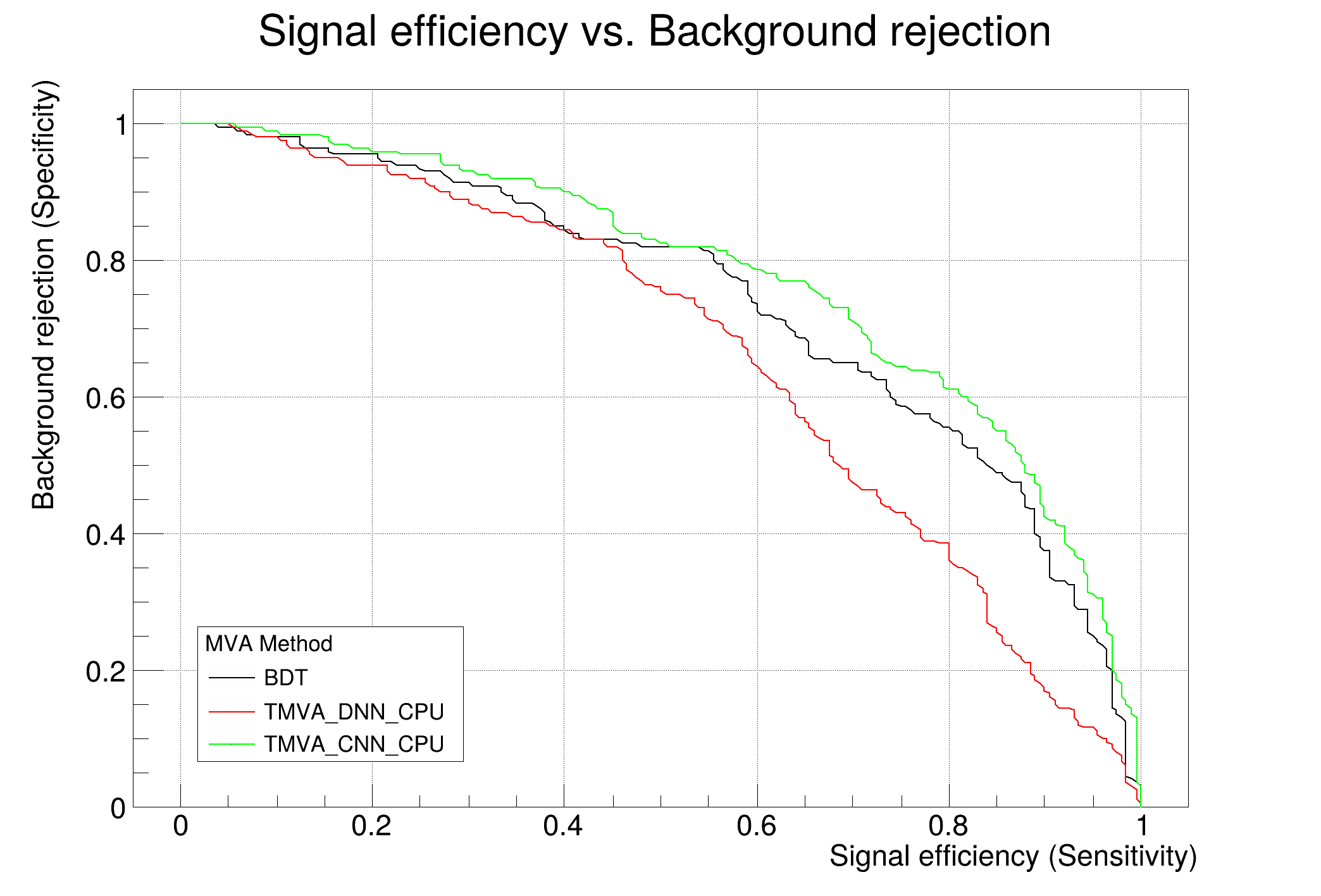
c1 = factory.GetROCCurve(loader)
c1.Draw()
outputFile.Close()
Option_t Option_t TPoint TPoint const char GetTextMagnitude GetFillStyle GetLineColor GetLineWidth GetMarkerStyle GetTextAlign GetTextColor GetTextSize void char Point_t Rectangle_t WindowAttributes_t Float_t Float_t Float_t Int_t Int_t UInt_t UInt_t Rectangle_t Int_t Int_t Window_t TString Int_t GCValues_t GetPrimarySelectionOwner GetDisplay GetScreen GetColormap GetNativeEvent const char const char dpyName wid window const char font_name cursor keysym reg const char only_if_exist regb h Point_t winding char text const char depth char const char Int_t count const char ColorStruct_t color const char Pixmap_t Pixmap_t PictureAttributes_t attr const char char ret_data h unsigned char height h Atom_t Int_t ULong_t ULong_t unsigned char prop_list Atom_t Atom_t Atom_t Time_t UChar_t len
Option_t Option_t TPoint TPoint const char GetTextMagnitude GetFillStyle GetLineColor GetLineWidth GetMarkerStyle GetTextAlign GetTextColor GetTextSize void char Point_t Rectangle_t WindowAttributes_t Float_t Float_t Float_t Int_t Int_t UInt_t UInt_t Rectangle_t Int_t Int_t Window_t TString Int_t GCValues_t GetPrimarySelectionOwner GetDisplay GetScreen GetColormap GetNativeEvent const char const char dpyName wid window const char font_name cursor keysym reg const char only_if_exist regb h Point_t winding char text const char depth char const char Int_t count const char ColorStruct_t color const char Pixmap_t Pixmap_t PictureAttributes_t attr const char char ret_data h unsigned char height h Atom_t Int_t ULong_t ULong_t unsigned char prop_list Atom_t Atom_t Atom_t Time_t format
A file, usually with extension .root, that stores data and code in the form of serialized objects in ...
static TFile * Open(const char *name, Option_t *option="", const char *ftitle="", Int_t compress=ROOT::RCompressionSetting::EDefaults::kUseCompiledDefault, Int_t netopt=0)
Create / open a file.
This is the main MVA steering class.
static void PyInitialize()
Initialize Python interpreter.
void EnableImplicitMT(UInt_t numthreads=0)
Enable ROOT's implicit multi-threading for all objects and methods that provide an internal paralleli...
UInt_t GetThreadPoolSize()
Returns the size of ROOT's thread pool.