

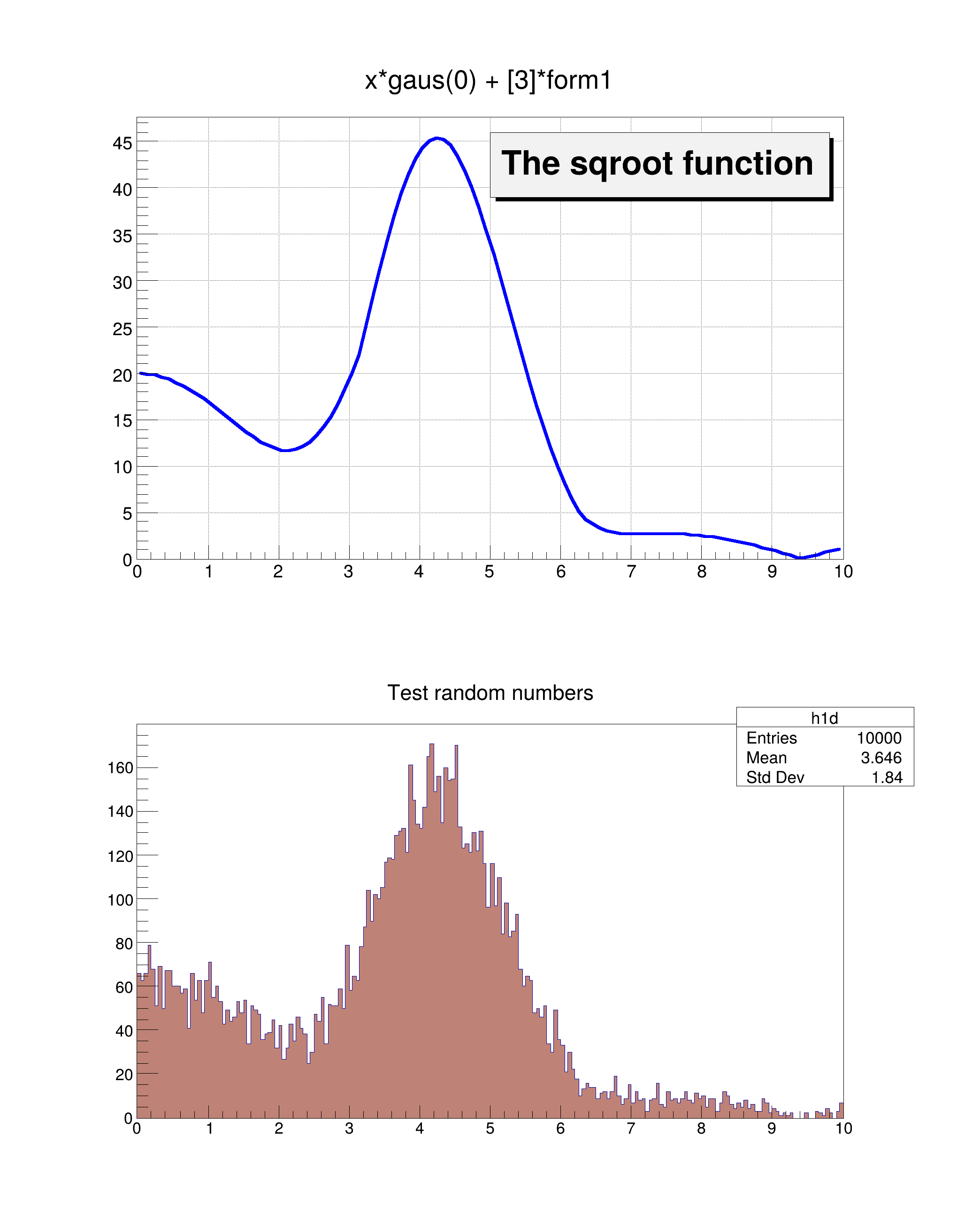
 Draw a 1D histogram to a canvas.
- Note
- When using graphics inside a ROOT macro the objects must be created with new.
~ë/_␅
void hist003_TH1_draw()
{
auto *form1 =
new TFormula(
"form1",
"abs(sin(x)/x)");
double rangeMin = 0.0;
double rangeMax = 10.0;
auto *sqroot =
new TF1(
"sqroot",
"x*gaus(0) + [3]*form1", rangeMin, rangeMax);
sqroot->SetLineColor(4);
sqroot->SetLineWidth(6);
sqroot->SetParameters(10.0, 4.0, 1.0, 20.0);
int nBins = 200;
auto *h1d =
new TH1D(
"h1d",
"Test random numbers", nBins, rangeMin, rangeMax);
h1d->FillRandom("sqroot", 10000);
int topX = 200;
int topY = 10;
auto *pad1 =
new TPad(
"pad1",
"The pad with the function", 0.05, 0.50, 0.95, 0.95);
auto *pad2 =
new TPad(
"pad2",
"The pad with the histogram", 0.05, 0.05, 0.95, 0.45);
pad1->Draw();
pad2->Draw();
pad1->cd();
pad1->SetGridx();
pad1->SetGridy();
pad1->GetFrame()->SetBorderMode(-1);
pad1->GetFrame()->SetBorderSize(5);
sqroot->Draw();
auto *lfunction =
new TPaveLabel(5, 39, 9.8, 46,
"The sqroot function");
lfunction->Draw();
pad2->cd();
pad2->GetFrame()->SetBorderMode(-1);
pad2->GetFrame()->SetBorderSize(5);
h1d->SetFillColor(45);
h1d->Draw();
}
Option_t Option_t TPoint TPoint const char GetTextMagnitude GetFillStyle GetLineColor GetLineWidth GetMarkerStyle GetTextAlign GetTextColor GetTextSize void char Point_t Rectangle_t height
1-D histogram with a double per channel (see TH1 documentation)
The most important graphics class in the ROOT system.
A Pave (see TPave) with a text centered in the Pave.
- Date
- November 2024
- Author
- Rene Brun, Giacomo Parolini
Definition in file hist003_TH1_draw.C.

